Working from home has become a standard lifestyle for millions of professionals worldwide. From corporate employees and freelancers to consultants and creators, nearly everyone now requires a reliable, long-lasting laptop that performs flawlessly throughout the day. A great WFH laptop needs more than fast hardware — it must offer a crystal-clear webcam for meetings, strong microphones for calls, smooth multitasking, efficient battery life, and a comfortable keyboard for long typing hours.
This 2025 edition highlights the Top 7 Laptops that stand out for remote work. Each laptop listed below is included based on performance, comfort, video call quality, durability, and value for money.
1. Apple MacBook Pro 14-inch (M3 Pro/M3 Max)
Best Overall Laptop for Power Users
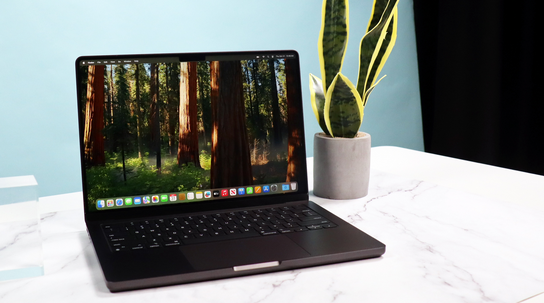
If you want unmatched performance with outstanding battery life, the MacBook Pro 14-inch continues to dominate as the best all-round laptop for professionals in 2025. Apple’s M3 Pro and M3 Max processors deliver exceptional power for heavy workloads—ideal for programmers, designers, analysts, engineers, and video editors.
Who Should Buy It
-
Software developers
-
Content creators
-
Power users with multiple apps open
-
Professionals using large spreadsheets, dashboards, or creative tools
Top Advantages
-
Brilliant Mini-LED display with high brightness and sharp clarity
-
Outstanding battery life even under medium to heavy workloads
-
Reliable thermal management allowing sustained top-tier performance
-
Excellent keyboard, trackpad, webcam, microphones, and speakers
-
Ideal for long meetings, screen-sharing, and high-resolution media work
What to Consider
-
Upgrades (RAM/storage) can make the price higher
-
macOS ecosystem may not support some niche Windows-only apps
-
Not the cheapest option — more suitable for serious professionals
Best Configuration
M3 Pro, 16–32GB RAM, 512GB–1TB SSD.
2. Apple MacBook Air (M4 or Latest M3 Version)
Best Ultraportable Laptop for Everyday Professionals
If your workday includes emails, documentation, Zoom meetings, web browsing, and general productivity apps, the MacBook Air remains the most efficient, quietest, and lightest machine you can buy in 2025. It delivers exceptional performance without any fan noise, making it perfect for bedroom or shared-space work setups.
Who Should Buy It
-
Managers
-
Freelancers
-
Writers
-
Students and remote office employees
-
Anyone who prioritizes portability and long battery life
Top Advantages
-
Fanless and silent operation
-
Extremely lightweight and thin
-
Long-lasting battery for all-day use
-
Smooth macOS experience and fast app performance
-
Fantastic display and speakers for calls and media
What to Consider
-
Not ideal for heavy video editing or intensive programming
-
Base RAM may not be enough; 16GB is recommended
Best Configuration
M4/M3, 16GB RAM, 512GB SSD.
3. Dell XPS 13 / XPS 13 Plus (2025 Models)
Best Premium Windows Ultrabook
The Dell XPS lineup remains one of the strongest Windows laptop families, combining premium design, a compact build, and impressive screen quality. With powerful new processors, an outstanding keyboard, and a lightweight structure, it’s an excellent choice for many WFH professionals.
Who Should Buy It
-
Windows users who want a high-end experience
-
Professionals looking for a stylish but powerful laptop
-
Remote workers who need a compact and durable machine
Top Advantages
-
Premium aluminum and glass build
-
High-resolution, sharp display (with OLED options available)
-
Excellent typing and trackpad experience
-
Strong performance for most productivity workloads
What to Consider
-
Limited ports — a USB-C hub may be needed
-
OLED models use more battery
-
Not ideal for users who want many built-in connectivity options
Best Configuration
Intel/AMD latest CPU, 16GB RAM, 512GB SSD.
4. Lenovo ThinkPad X1 Carbon (Gen 11/12)
Best Laptop for Typing, Business, and Long Meetings
ThinkPad laptops are legendary for reliability, comfort, and enterprise-grade features, and in 2025, the X1 Carbon remains a top favorite among business professionals. Its keyboard is unbeatable, and its webcam/microphone setup is designed specifically for professional communication.
Who Should Buy It
-
Executives
-
Consultants
-
Business professionals needing durability
-
Heavy typists and meeting-focused remote workers
Top Advantages
-
One of the best keyboards in the entire laptop industry
-
Excellent webcam and microphones
-
Multiple ports for monitors and accessories
-
Durable, lightweight carbon-fiber design
-
Enterprise security features for remote office work
What to Consider
-
Slightly more expensive than other Windows laptops
-
The design is minimalistic, not flashy
-
Some models require upgrades to reach ideal performance
Best Configuration
16–32GB RAM, 1TB SSD, Full HD+ display with privacy features.
5. HP Spectre x360 (2025)
Best 2-in-1 Convertible Laptop
The HP Spectre x360 is one of the best convertible laptops for professionals who prefer flexibility. Its ability to shift between laptop, tent, stand, and tablet mode makes it ideal for presentations, creative sketching, or working in different physical positions throughout the day.
Who Should Buy It
-
Designers who use a stylus
-
Professionals who annotate documents
-
Hybrid workers who want a flexible form factor
-
Those who enjoy touchscreen navigation
Top Advantages
-
Convertible form factor with stylus support
-
Excellent OLED display options
-
Premium metal construction
-
Strong speakers, microphone setup, and webcam
-
Ideal for creative and presentation-heavy workflows
What to Consider
-
Slightly heavier compared to thin ultrabooks
-
OLED option reduces battery life
-
Not targeted at heavy 3D editing or workstation tasks
Best Configuration
Intel Core Ultra/Ryzen latest, 16GB RAM, 512GB–1TB SSD.
6. Microsoft Surface Laptop (2025)
Best for Smooth, Clean Windows Experience
Microsoft’s Surface Laptop line is known for its elegant design, long-lasting battery life, and polished Windows performance. The 2025 version includes updated performance, improved webcam quality, and new AI integrations for smoother productivity.
Who Should Buy It
-
Professionals who prefer Microsoft’s clean design
-
Users who like a minimalistic, lightweight laptop
-
Remote workers who want reliable video calls
-
Students and business users
Top Advantages
-
Crisp, vibrant display
-
Lightweight, premium build
-
Clean Windows experience with first-party optimization
-
Good microphone and camera quality
-
Great for productivity and everyday tasks
What to Consider
-
Port selection is limited
-
Not ideal for heavy rendering or high-end GPU tasks
-
Requires external dongles for multi-monitor setups
Best Configuration
16GB RAM, 512GB SSD, latest Intel or Qualcomm chip.
7. ASUS Zenbook A14 / ZenBook S (2025)
Best Value-for-Money Premium Laptop
The ASUS Zenbook series continues to offer top-tier displays, reliable performance, and long battery life at a more affordable price compared to other premium brands. In 2025, the Zenbook A14 and ZenBook S models are among the best-balanced productivity laptops.
Who Should Buy It
-
Professionals seeking a premium feel at a reasonable price
-
Remote workers who want strong display quality
-
Multitaskers needing good performance without overpaying
Top Advantages
-
Brilliant OLED displays with sharp, vibrant visuals
-
Strong battery life for productivity work
-
Excellent value compared to competitors
-
Light and portable
-
Good performance for everyday professional tasks
What to Consider
-
Not as serviceable as ThinkPads
-
Not intended for heavy GPU-intensive content creation
-
Some models may have fewer port options
Best Configuration
Core Ultra/Ryzen latest, 16GB RAM, 512GB SSD.
How to Pick the Right Laptop for Work-From-Home (2025 Guide)
Choosing the right laptop depends on understanding what kind of work you do daily. Use this checklist to pick the perfect model:
1. Know Your Workload
-
Light tasks (emails, docs, browsing): 16GB RAM + efficient CPU
-
Medium tasks (multiple apps, spreadsheets, light editing): 16–32GB RAM
-
Heavy tasks (editing, programming, datasets): 32GB RAM + powerful CPU
2. Prioritize Webcam & Mic Quality
Most professionals spend hours in meetings. Choose laptops with high-quality webcams, noise-canceling microphones, and good speakers.
3. Consider Battery Life
If you often work away from your desk, choose models with long-lasting batteries. OLED screens consume more power; LCD models last longer.
4. Look at Keyboard Comfort
If you type for hours, ThinkPads and MacBooks are the best for comfort.
5. Check Port Selection
If you use external monitors, USB devices, or Ethernet, ensure the laptop supports it — or buy a docking station.
6. Operating System
-
macOS is great for creative and coding workflows.
-
Windows is ideal for business, enterprise tools, and compatibility.
Best Recommendations (Simple Summary)
-
Best Overall: MacBook Pro 14-inch
-
Best for Everyday Work & Portability: MacBook Air
-
Best Windows Ultrabook: Dell XPS 13
-
Best for Business Professionals & Typing: Lenovo ThinkPad X1 Carbon
-
Best Convertible 2-in-1: HP Spectre x360
-
Best Clean Windows Experience: Microsoft Surface Laptop
-
Best Value for Money: ASUS Zenbook A14 / ZenBook S
Final Words
Choosing the right work-from-home laptop in 2025 means balancing performance, display quality, portability, webcam clarity, and battery life. The models above are the strongest options across all categories, ensuring smooth workflow, comfortable meetings, and a reliable long-term experience.